Categories
Computers

Import NetStumbler Data To MySQL Database

Wrote a little program that imports your NetStumbler text file export into a MySQL database. Very simple program that runs automatically using the data file uploaded into same directory. No fancy file uploading nor does it include viewing and sorting or doing anything with the data, yet. It also does not check against previous entries, so you’ll have to dump your MySQL before importing again.. The newest release checks for duplicates using MAC on import. That is up to you what you need it in a database for.

(excuse my poor versioning, etc, first time really trying to keep up with version numbers, details of improvements and GPL)

ns2db-v1.1b-with-viewer.zip – bug fix for lat/long field (thanks pixel), checks against MAC to prevent duplicates on import

ns2db-v1.1b.zip – added table view of data
ns2db-v1.0.zip

Categories
Computers

How To Convert Zune Playlist zpl to m3u or wpl

1.  Browse to My Music under My Documents and open the Zune folder.
2.  Copy the zpl file you want to your Desktop and rename it to wpl.
3.  Open the wpl with Windows Media Player (zpl and wpl are basically very similar)
All your songs from the playlist should be in Now Playing and no other songs.
4. Right-click on the title bar to get to the hidden menu or press CTRL+M for Classic Menus.
5. Go to File > Save Now Playing List As…, then change the format to m3u or wpl.
Source: Zunescene (archive.org)

You can also open m3u into Winamp. Then, using the gen_yar.dll (Yar-Matey! Playlist Copier v1.07) plugin you can export the files from the playlist to a specified folder, such as an SD card or flash drive.

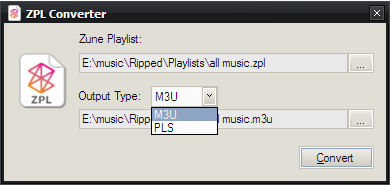
Update: I found a program that will convert to m3u and pls directly from the file to a specified location.
Zune Playlist Converter by HazteK Software