1. Browse to My Music under My Documents and open the Zune folder.
2. Copy the zpl file you want to your Desktop and rename it to wpl.
3. Open the wpl with Windows Media Player (zpl and wpl are basically very similar)
All your songs from the playlist should be in Now Playing and no other songs.
4. Right-click on the title bar to get to the hidden menu or press CTRL+M for Classic Menus.
5. Go to File > Save Now Playing List As…, then change the format to m3u or wpl.
Source: Zunescene (archive.org)
You can also open m3u into Winamp. Then, using the gen_yar.dll (Yar-Matey! Playlist Copier v1.07) plugin you can export the files from the playlist to a specified folder, such as an SD card or flash drive.
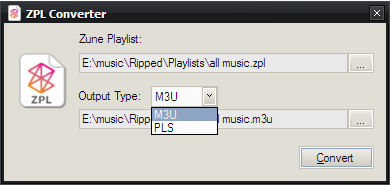
Update: I found a program that will convert to m3u and pls directly from the file to a specified location.
Zune Playlist Converter by HazteK Software
10 replies on “How To Convert Zune Playlist zpl to m3u or wpl”
Thank you! I’ve searched all over for way to convert .wpl to any file usable by other systems. All I could find were expensive or complicated third party solutions. Yours is simple and works.
I just wanted to say thank you for making the .zpl converter, I like the zuneplayer more than itunes and recently bought a ipod nano since my Gen 1 Zune is to bulky to work out with.
long story short it works and i thank you for this file converter
If someone wants to keep to Zune playlist and just transfer the MP3s to other folders or e.g. a smartphone you can use ZUNPLEX instead from http://www.zuneboards.com/forums/showthread.php?t=61044
Thank You! I have been searching all over to find a way to put my Zune playlists on my Nokia 920.
Microsoft really dropped the ball when it comes to music and Windows 8. I hope they resolve the issue soon.
I works prefect! Awesome! Thanks!
I, too, wanna say thank you for this. I use zune and make a lot of Auto Playlists. Nice to convert them for use on my phone, etc. Thanks!
This saved my life! Microsoft really f@*ked everyone who actually enjoyed the Zune.
Is there a way I can transfer my Zune Playlist to Google Play Music or Microsoft Groove Music? I have been searching and searching and cannot find anything .Please help
Hi Darrell! I’m glad to see traffic coming in from this blog post, even 8 years after you originally posted it. I’d like to suggest you update the link to my site though. It is pointing to a page that is no longer valid. The new link is https://www.haztek-software.com/applications/multimedia/zune-playlist-converter/
I am trying to convert some zpl playlists to m3u but the link to the coverter program is not working. I don’t know if anyone comes here anymore, but I have a couple of playlists that were in WMP. WMP is no longer working on my Windows 10 desktop and I can’t find a work around. Groove Music is no help, and I use Media Monkey mostly for my music but it won’t open the zpl playlist. Any suggestions out there? I’ve been researching for days.