Pressing Ctrl+B in Chrome opens and closes the Bookmarks Toolbar. By default, Firefox Ctrl+B toggles the Bookmarks Sidebar. Here is how to apply the same shortcut key to Firefox as in Chrome. The Bookmarks Sidebar will still be accessible with Ctrl+I.
Install keyconfig.xpi posted in the mozillaZine forums. It is not an official hosted plugin. There is also a keyconfig wiki.

After the install and Firefox restarts…
1. Tools > Keyconfig (Ctrl+Shift+F12)
2. Click once to highlight Boomarks Ctrl+B
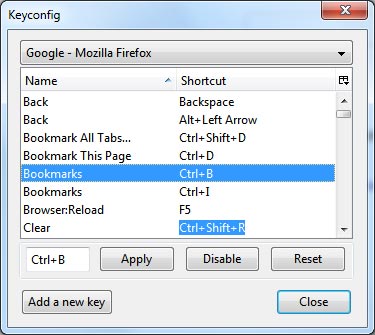
3. hit Disable
4. Click Add a new key button or double click on Bookmarks
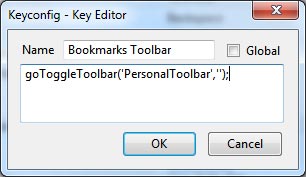
5. Change the Name to Bookmarks Toolbar and paste this code:
goToggleToolbar('PersonalToolbar','');
Hit OK
6. With Bookmarks Toolbar highlighted click in the box next to Apply and then press Ctrl+B. Hit Apply. Then Close. Restart Firefox
Make sure that the Bookmarks Toolbar is checked on in View > Toolbars in the Firefox menu. Hitting Ctrl+B should now toggle the Bookmarks Toolbar instead of the sidebar. The Bookmarks Sidebar can still be toggled with Ctrl+I.
Source: Firefox Support Forums
Another code is also posted in 2010 in the Firefox Support Forums. But the short form above does work in Firefox 3.6.x
var E=document.getElementById('PersonalToolbar');

if(E.collapsed){E.removeAttribute('collapsed')}

else{E.setAttribute('collapsed',true)}
5 replies on “Firefox Ctrl+B toggle Bookmarks Toolbar like Chrome”
Got it working in Firefox 4 with this code:
var b=document.getElementById(‘PersonalToolbar’);
b.collapsed=!b.collapsed;
the 3.6.x code works in FF5, great ext.
no such luck for ff4.
I’ve created a small script for autohotkey, that acts as a macro to do this since I haven’t found any working script to use with keyconfig.xpi
If anyone is interested download AutoHotKey, create new script and paste:
!a::
Send !v{Right}{Down}{Down}{Enter}
return
This will toggle the bookmarks toolbar on/off with Alt+A key command … change first line of script if you want a different keyboard shortcut.
The 2010 code above works as far as Aurora 20.